
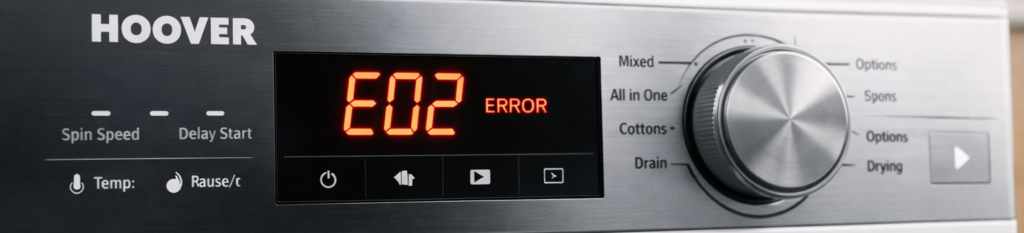
If your Hoover washing machine stops mid‑cycle and shows the E02 error, it’s warning you that the machine isn’t filling with water correctly. The good news? Most E02 issues are simple to fix at home — no engineer needed.
This guide explains what the Hoover E02 error means, the real causes, and the exact steps to get your washer running again.
🔍 What the Hoover E02 Error Means
The E02 error appears when the washing machine detects a water fill problem. In simple terms: the machine isn’t getting enough water, fast enough.
This can happen at the start of a wash, during rinsing, or after a pause.
⚠️ Common Causes of the E02 Error
1. Low water pressure
If your tap pressure is weak, the machine can’t fill in time.
2. Kinked or blocked inlet hose
The hose behind the machine may be bent, twisted, or clogged.
3. Blocked inlet filter
Tiny mesh filters inside the hose connection can fill with limescale or grit.
4. Faulty water inlet valve
If the valve doesn’t open properly, water can’t enter the drum.
5. Tap not fully open
A surprisingly common cause — especially after moving the machine.
6. Frozen pipes (winter issue)
If the pipe is partially frozen, water flow slows down.
🛠️ How to Fix the Hoover E02 Error (Step‑by‑Step)
1. Turn the machine off and on again
A simple reset can clear temporary fill‑time errors.
- Turn the washer off
- Unplug it for 2 minutes
- Plug it back in
- Restart the cycle
If the error returns, continue below.
2. Check the water tap
Make sure the tap feeding the machine is:
- Fully open
- Not stiff
- Not partially closed
Turn it clockwise to close, anti‑clockwise to fully open.
3. Inspect the inlet hose
Pull the machine forward slightly and check:
- Is the hose kinked?
- Is it crushed behind the machine?
- Is it twisted?
Straighten it out and restart the cycle.
For official guidance on washing machine faults, you can also check the Hoover support page: https://www.hoover.co.uk/en_GB/support
4. Clean the inlet filter (most common fix)
Inside the hose connection is a small mesh filter.
To clean it:
- Turn off the water tap
- Unscrew the inlet hose
- Use pliers to gently pull out the mesh filter
- Rinse it under hot water
- Remove limescale or grit
- Reinsert and reconnect the hose
Restart the machine.
5. Check household water pressure
If your taps are slow, the machine will struggle too.
Try:
- Running the kitchen tap
- Running the bathroom tap
If both are weak, the issue is your home’s water supply — not the machine.
6. Inspect the water inlet valve
If the valve is faulty, the machine won’t fill properly.
Signs of a bad valve:
- Loud buzzing
- Slow fill
- No water entering at all
- E02 appears immediately
If faulty, the valve needs replacing.
🧼 How to Prevent the E02 Error in Future
- Keep the inlet hose straight
- Clean the inlet filter every 6 months
- Avoid pushing the machine too far back
- Check water pressure if you live in a low‑pressure area
- Insulate pipes in winter
“If your Hoover washer won’t drain, see our Hoover E03 Error Fix.”
“For heating issues, check the Hoover E05 Error Guide.”
“If your washer won’t start, read the Hoover E01 Error Fix.”
If the Hoover E02 error keeps returning even after cleaning the inlet filter and checking the hose, it’s worth running a quick maintenance wash to clear any internal residue. Detergent build‑up or trapped debris inside the machine can slow the water flow just enough to trigger the error again. A hot empty cycle with a cleaner helps reset the system and ensures the washer fills at the correct speed.
FAQs
Q: What causes the Hoover E02 error? A: Low water pressure, blocked inlet filters, kinked hoses, or a faulty inlet valve.
Q: Can I fix the E02 error myself? A: Yes — most E02 issues are simple and don’t require an engineer.
Q: Does the E02 error mean the valve is broken? A: Not always. Blocked filters and kinked hoses are more common.