
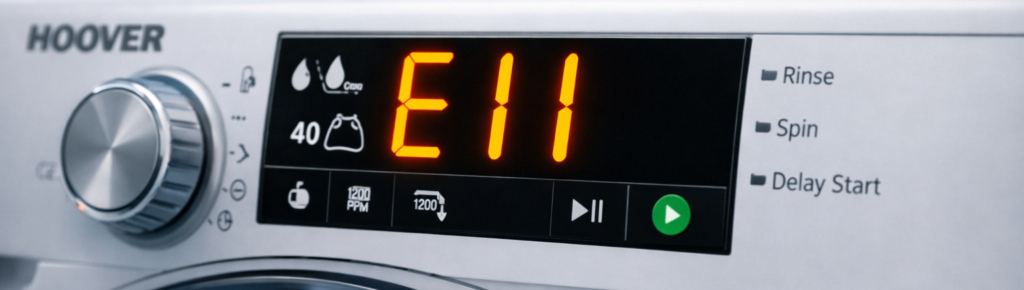
If your Hoover washing machine stops mid‑cycle and flashes E11, it’s warning you that the machine couldn’t drain water within the expected time. This is one of the most common Hoover faults — and thankfully, one of the easiest to fix at home.
This guide explains what the Hoover E11 error means, the real causes, and the step‑by‑step fix that actually works.
Quick Answer
E11 means the washing machine failed to drain water in time.
Most common causes:
- Blocked drain pump or filter
- Clogged drain hose
- Kinked outlet hose
- Faulty drain pump
- Wiring or pressure sensor issue
Quick Fix: Clean the drain filter → check the hose → restart the cycle.
What the Hoover E11 Error Actually Means
The Hoover E11 error appears when the machine tries to drain water but doesn’t detect the water level dropping quickly enough. Hoover washers use a pressure sensor to monitor water levels. If the sensor still detects water after the drain cycle runs for a set time, the machine stops and shows E11.
This can happen:
- After a wash or rinse cycle
- When the machine pauses mid‑cycle
- When the drain pump is blocked or slow
The E11 code protects the machine from overfilling or flooding.
Symptoms of the E11 Error
You’ll notice:
- The machine finishes washing but won’t spin
- Water remains in the drum
- You hear the pump humming but no water drains
- The display flashes E11
- The door stays locked after the cycle ends
If the drum still has water, the machine refuses to spin — that’s why E11 often appears alongside “not spinning” complaints.
Common Causes of the Hoover E11 Error
Let’s break down the real‑world causes, starting with the most likely.
1. Blocked Drain Filter (Most Common)
The drain filter catches lint, coins, hairpins, and debris. When it clogs, water can’t escape fast enough — triggering E11.
Fix: Clean the drain filter (steps below).
2. Clogged Drain Hose
Soap residue and lint can build up inside the hose, restricting flow.
Fix: Disconnect and flush the hose with hot water or a flexible cleaning brush.
3. Kinked or Twisted Outlet Hose
If the hose is crushed behind the machine, water can’t drain properly.
Fix: Pull the machine forward and straighten the hose.
4. Faulty Drain Pump
If the pump motor fails or the impeller jams, water won’t move.
Fix: Check for blockages first. If the pump doesn’t hum or vibrate, it may need replacing.
5. Pressure Sensor or Wiring Fault
If the sensor doesn’t detect water level changes, the machine assumes it’s still full.
Fix: This requires testing with a multimeter — best handled by a technician.
How to Fix the Hoover E11 Error (Step‑by‑Step)
Follow these steps in order. Most people fix the issue by step 3.
1. Turn Off and Unplug the Machine
Safety first. Unplug the machine and place a towel under the filter area.
2. Drain Remaining Water Manually
Open the small flap at the bottom front of the machine. Place a shallow tray underneath. Slowly unscrew the drain cap — water will flow out.
3. Clean the Drain Filter
Once drained, remove the filter completely.
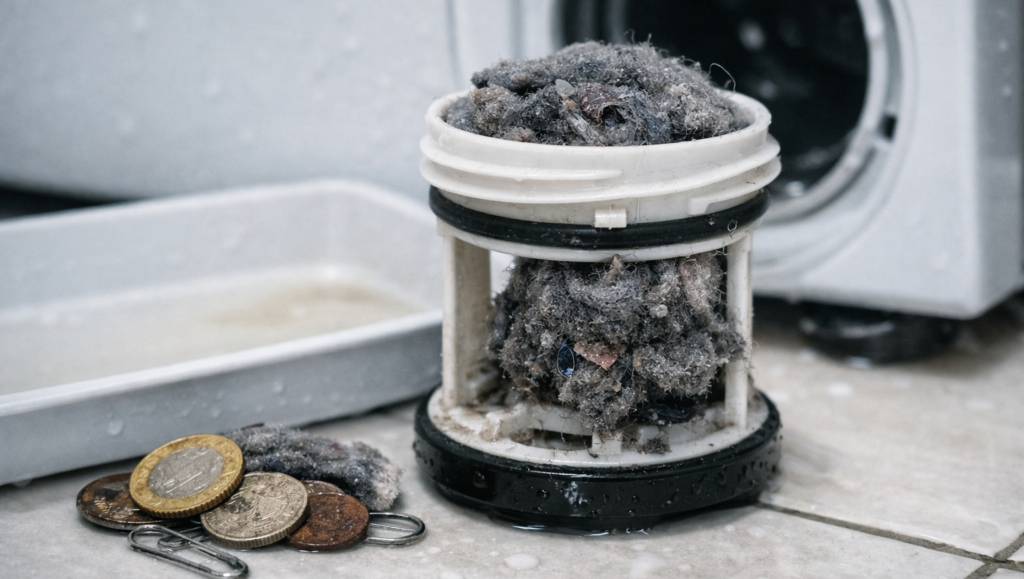
Check for:
- Coins
- Hairpins
- Lint
- Buttons
- Small socks
Clean thoroughly under running water. Reinsert the filter and tighten securely.
4. Check the Drain Hose
Pull the machine forward slightly. Inspect the hose for:
- Kinks
- Twists
- Blockages
Disconnect it from the wall drain and flush it with hot water.
5. Restart the Machine
Plug it back in and run a short rinse or spin cycle. If it drains normally, the error is cleared.
6. If E11 Returns
If the error reappears:
- The pump may be faulty
- The pressure sensor may be misreading
- Wiring may be loose
At this stage, call a technician or Hoover support.
Preventing the E11 Error in Future
A few simple habits can stop E11 from returning:
- Clean the drain filter monthly
- Avoid overloading the drum
- Use the correct detergent amount
- Keep the outlet hose straight
- Run a maintenance wash every few weeks
These small steps keep the drainage system clear.
Models Affected by the E11 Error
The E11 code appears on most Hoover washers, including:
- Hoover H‑WASH 300
- Hoover H‑WASH 500
- Hoover Dynamic Next
- Hoover Link
- Hoover AXI
The fix is identical across all models.
Why the E11 Error Happens After a Power Cut
If power is interrupted mid‑cycle, the machine may stop before draining. When restarted, it detects water still in the drum and shows E11. Simply drain manually and restart the cycle.
Why the E11 Error Happens Mid‑Cycle
If E11 appears during rinsing or spinning, it means the machine drained too slowly. This usually points to a blocked filter or hose.
Internal Links (SEO Cluster)
Add these inside your content for strong internal linking:
- Hoover E03 Error — Drain Pump Fix
/hoover-e03-error/ - Hoover E05 Error — Heating Element Fix
/hoover-e05-error/ - Hoover E10 Error — Water Fill Timeout Fix
/hoover-e10-error/ - Hoover E01 Error — Door Lock Fix
/hoover-e01-error/ - All Hoover Guides
/category/hoover/
Outbound Links (Authority Boost)
Use one or two of these external references:
- Hoover Official Support: https://www.hoover.co.uk/en_GB/support
- Electrical Safety First (UK):
https://www.electricalsafetyfirst.org.uk/guidance/(electricalsafetyfirst.org.uk in Bing) - Citizens Advice — Consumer Rights:
https://www.citizensadvice.org.uk/consumer/(citizensadvice.org.uk in Bing)
FAQ
Q: What does the Hoover E11 error mean? It means the machine couldn’t drain water fast enough — usually due to a blocked filter or hose.
Q: Can I fix the E11 error myself? Yes. Cleaning the drain filter and hose usually solves it.
Q: Why does my Hoover washer show E11 and not spin? Because it still detects water in the drum — spinning won’t start until it’s drained.
Q: How often should I clean the drain filter? At least once a month, or more often if you wash pet bedding or heavy fabrics.
Q: Does E11 mean the pump is broken? Not always. Most E11 errors are caused by blockages, not pump failure.
Q: Can I reset the Hoover E11 error? Yes — unplug the machine for two minutes, then restart a short cycle after cleaning the filter.