
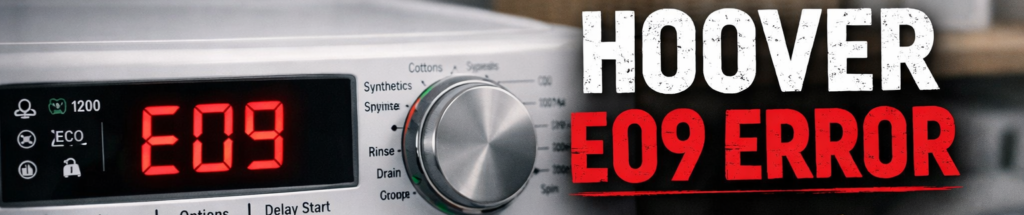
The Hoover E09 error appears when the washing machine detects a motor triac fault or a drive module failure. In simple terms, the machine can’t control the motor’s power correctly, so it stops the cycle to prevent damage.
The triac is a power‑control component on the PCB. If it burns out or fails, the motor receives unstable power, which triggers the Hoover E09 erro
This guide explains what the Hoover E09 error means, the real causes, and the step‑by‑step fixes that actually work at home.
How the TRIAC Works (Simple Diagram)
Mains Power
│
▼
┌──────────┐
│ TRIAC │ ← Controls how much power the motor receives
└──────────┘
│
▼
┌──────────┐
│ MOTOR │ ← Spins the drum
└──────────┘
If the TRIAC fails:
- Too much or too little power reaches the motor
- Motor jerks, stalls, or won’t start
- The control board triggers the Hoover E09 error
https://www.hoover.co.uk/en_GB/support
Hoover E09 Error — What It Means
The E09 code is linked to the motor’s power control system. You’ll usually see it when:
- The drum won’t turn at all
- The machine starts then stops instantly
- The motor jerks or pulses
- The washer cuts out during spin
The control board shuts everything down because it can’t safely drive the motor.
Common Causes of the Hoover E09 Error
1. Faulty motor triac (on the PCB)
The triac regulates motor power. If it fails, the motor can’t run smoothly — triggering the Hoover E09 error.
2. Damaged drive module
Some Hoover models use a separate drive board. If it fails, the motor receives unstable power.
3. Burnt or loose wiring
Heat, vibration, or moisture can damage the wiring between the PCB and motor.
4. Motor coil failure
If the motor windings are burnt or shorted, the PCB detects a fault and stops the cycle.
5. Moisture or corrosion on the PCB
A damp control board can misread motor signals and trigger E09.
How to Fix the Hoover E09 Error (Step‑by‑Step)
1. Reset the machine
- Turn it off
- Unplug for 2 minutes
- Plug back in
- Restart the cycle
If the Hoover E09 error returns, continue below.
2. Check the drum movement
Spin the drum by hand. If it’s stiff or grinding, the motor may be jammed or damaged.
3. Inspect the motor wiring
Remove the back panel and check:
- Motor plug
- PCB connectors
- Drive module wiring (if fitted)
Look for burnt marks, loose plugs, or corrosion.
4. Examine the control board (PCB)
The triac is located on the main PCB. Signs of failure include:
- Burnt smell
- Blackened components
- Melted solder joints
If damaged, the PCB needs repair or replacement.
5. Check the drive module (inverter models)
If your Hoover uses an inverter motor, the drive board may be faulty. A failed module will cause instant E09 errors.
6. Test the motor
If the motor windings are burnt or shorted, the machine will not spin. A replacement motor may be required.
7. Run a short spin cycle
If the machine runs normally, the issue was wiring‑related.
Advanced Checks for the Hoover E09 Error (2026 Models)
Triac overheating
Newer PCBs include thermal protection. If the triac overheats, the machine shuts down and shows E09.
Drive module capacitor failure
A failing capacitor causes unstable motor power. This is a common cause on 2023–2026 Hoover models.
Moisture‑related PCB faults
Condensation or leaks can cause temporary E09 errors. Let the machine dry for 24 hours.
How to Prevent the Hoover E09 Error in Future
- Avoid overloading the drum
- Keep the machine dry and well‑ventilated
- Don’t run heavy cycles back‑to‑back
- Check wiring after moving the appliance
- Clean filters regularly
Hoover E09 Error — When to Call an Engineer
Call a professional if:
- The PCB is burnt
- The drive module has failed
- The motor windings are damaged
These faults require specialist tools and parts.
FAQs About the Hoover E09 Error
What causes the Hoover E09 error?
Usually a faulty triac, damaged drive module, or burnt wiring.
Can I fix the Hoover E09 error myself?
Yes — wiring issues are fixable at home. PCB or motor faults require an engineer.
Does E09 mean the motor is dead?
Not always. Check wiring and the PCB first.
Hoover E09 Error — When to Call an Engineer
Call a professional if:
- The PCB is burnt
- The drive module has failed
- The motor windings are damaged
These faults require specialist tools and parts.
For door‑lock‑related faults, check the Hoover E07 error guide (how2not2.com in Bing).
Error in Future
- Avoid overloading the drum
- Keep the machine dry and well‑ventilated
- Don’t run heavy cycles back‑to‑back
- Check wiring after moving the appliance
- Clean filters regularly
If you’re dealing with drainage issues instead, see the Hoover E03 error guide (how2not2.com in Bing).