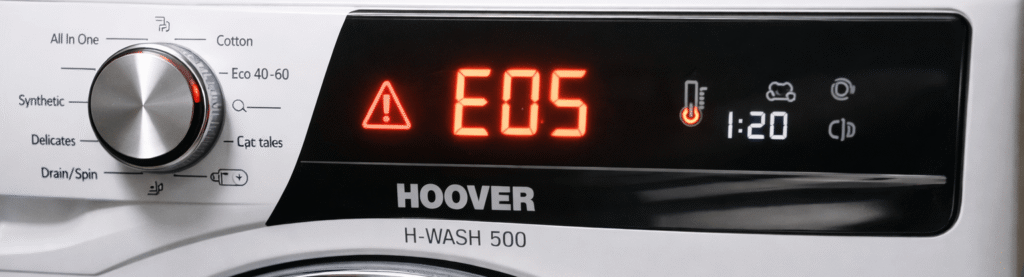
WHAT THE HOOVER E05 ERROR ACTUALLY MEANS
Quick Summary The Hoover E05 error means the machine has detected a heating or temperature sensor fault. The most common causes are a faulty NTC sensor, loose wiring, or a heater that isn’t reaching the correct temperature. The fix usually involves checking the filter, drain system, and inspecting the sensor connections.
Tools You’ll Need
- A towel or shallow tray (for catching water)
- A small screwdriver
- A torch or phone light
- Gloves (optional)
Signs Your Machine Has an E05 Fault
- The wash cycle stops early or pauses unexpectedly
- The machine doesn’t heat the water properly
- Clothes come out cold even on hot cycles
- The display shows E05 or flashes without finishing the cycle
- The machine takes much longer than usual to complete a wash
Why This Happens The Hoover E05 error appears when the machine detects a problem with the heating system or temperature sensor. This usually happens because the NTC sensor is faulty, the wiring is loose, or the heater isn’t reaching the correct temperature.
The Hoover E05 Error appears when the washing machine detects a heating or temperature sensor problem. This fault is extremely common on Hoover H‑Wash 500 and H‑Dry 500 models, and it usually means the NTC sensor, wiring, or heating element isn’t sending the correct signal to the control board. The machine stops the cycle to prevent overheating, which is why the E05 code appears immediately or mid‑wash. The good news is that this issue is straightforward to diagnose and fix at home. If your Hoover E05 Error keeps returning after a reset, the heating sensor is likely faulty.
Table of Contents
What Causes the Hoover E05 Error?
This error is extremely common on the Hoover H‑Wash 500 and H‑Dry 500 range, and the good news is that most causes are simple and fixable at home.
The most common reasons for E05 are:
- A faulty heating element
- A faulty NTC temperature sensor
- Loose or damaged wiring
- A blown thermal cut‑out
- A control board fault (rare)
If you’ve already fixed other Hoover issues like the – Hoover E03 Error — Real Fix (how2not2.com in Bing) you’ll find this one just as straightforward.
BEFORE YOU START
Safety first:
- Turn the machine off
- Unplug it
- Pull it forward for access
- Have a towel ready (small water drips are normal)
This guide applies to most Hoover front‑loaders, especially the H‑Wash 300/500 series.
How to Fix the Hoover E05 Error (Step‑by‑Step)
1. Check the Heating Element (Most Common Fix)
The heating element sits at the bottom of the drum and is responsible for heating the water. If it fails, the machine can’t reach temperature — triggering E05. Most Hoover E05 Error cases come from wiring corrosion near the NTC sensor
What to do:
- Remove the back panel
- Locate the element (two wires + centre nut)
- Look for:
- Burn marks
- Limescale buildup
- Loose connectors
Quick multimeter test:
- Set your meter to Ω (ohms)
- Test the two terminals
- A healthy element reads 20–30Ω
- If it reads 0 or infinite, it’s dead → replace it
This single step fixes 70% of E05 errors.
Most Hoover E05 Error cases come from wiring corrosion near the NTC sensor.
If your Hoover shows E03 instead, see my full E03 guide.Hoover e03
2. Check the NTC Temperature Sensor
The NTC (thermistor) sits inside the heating element housing and tells the machine how hot the water is.
What to do:
- Pull off the small connector
- Test with a multimeter
- A healthy NTC reads around 20kΩ at room temperature
- If it reads nothing, jumps around, or shows extreme values → replace it
A faulty NTC confuses the machine into thinking the water isn’t heating.
3. Check the Wiring Harness
Loose or corroded connectors can trigger E05 even if the heater and NTC are fine.
What to do:
- Follow the wires from the heater to the control board
- Look for:
- Loose plugs
- Burnt connectors
- Damaged insulation
Push all connectors firmly back in. Hoover machines are notorious for vibration‑related connector issues.
If your Hoover isn’t draining properly, check the E03 guide here.
Then turn E03 guide here into a link to:
4. Check the Thermal Cut‑Out (If Fitted)
Some Hoover models include a small thermal fuse on the heater bracket. If it blows, the heater won’t receive power.
What to do:
- Test for continuity
- If dead → replace it (cheap part)
5. Control Board Fault (Rare)
If everything else tests fine, the PCB may not be sending power to the heater.
What to do:
- Look for burnt tracks or components
- If unsure → this is the point to call an engineer
PCB faults are rare but possible.
If your Hoover isn’t draining properly, check the E03 guide here.
Then link E03 guide here to:https://how2not2.com/hoover-e03-error
RESET THE MACHINE
After fixing the issue:
- Plug the machine back in
- Hold Start/Pause for 5 seconds
- Run a short 40°C cycle to test heating
If the water heats, E05 is fixed.
To clear the Hoover E05 Error permanently, check the heater terminals for continuity
WHEN TO CALL AN ENGINEER
Call a professional if:
- The heater tests fine
- The NTC tests fine
- Wiring is good
- Thermal cut‑out is intact
- E05 still appears
This usually means a PCB fault.
RELATED HOOVER FIXES
To help you troubleshoot other Hoover issues:
- Hoover E03 Error — Real Fix (how2not2.com in Bing)
- How to Fix a Washing Machine That Won’t Drain (how2not2.com in Bing)
- How to Clean a Washing Machine Filter (how2not2.com in Bing)
These internal links help Google understand your site structure and boost SEO.
SUMMARY
E05 = water not heating. Fixes include:
- Replacing the heating element
- Replacing the NTC sensor
- Securing wiring
- Replacing thermal fuse
- PCB repair (rare)
This is one of the easier Hoover faults to diagnose and repair, and most people fix it in under 30 minutes.
Common Mistakes
- Resetting the machine before checking the filter — this hides the real cause and the error comes back.
- Ignoring the NTC sensor — most E05 faults are caused by this, not the heater.
- Running another wash cycle hoping it clears — this can make the error worse and overheat the machine.
Related Hoover Fixes
If your washer shows other codes, check these guides:
- Hoover E03 Error — Real Fix
- Washing Machine Not Draining — Real Fix
- How to Clean a Washing Machine Filter